

Best overall for study explanations: ChatGPT. Best for studying your own notes: NotebookLM. Best for checking calculations: Wolfram Alpha. This guide compares the best AI tools for students in 2026 by task, cost considerations, and classroom limits—not by which tool produces the most polished homework.
- Jolt Journal ranks ChatGPT first among the best AI tools for students for general study explanations, not verified answers.
- NotebookLM suits source-based study; Wolfram Alpha suits calculation checks; Claude suits draft feedback; Grammarly suits sentence editing.
- Check current charges, usage limits, and school rules before choosing a study tool.
- Use AI study tools to practice and review, not to submit work you cannot explain.
Why this matters
The wrong tool can give you a convincing answer to a different problem. A writing assistant does not verify a citation, and a calculation engine does not know your instructor's required method. Your assignment rules matter more than any ranking.
Jolt Journal covers technology and money in plain English. For students, that means separating what a tool helps you do from what you still have to check yourself.
Start with the task you cannot complete, not the subscription you are considering. If your problem is understanding lecture notes, a tool that rewrites essays is not the right starting point.
What makes the best AI tools for students
These criteria put learning and classroom suitability ahead of answer generation:
- Task fit: Does the tool explain concepts, work from supplied sources, calculate, critique, or edit?
- Checkability: Can you compare its answer with your textbook, source document, or an independently worked solution?
- Student control: Can you request hints and questions instead of a finished assignment?
- Classroom permission: Does your instructor allow this specific use, including uploading course material?
- Cost transparency: Can you identify the applicable charges, renewal terms, and feature limits before signing up?
- Data boundaries: Can you complete the task without sharing personal information, classmates' work, or restricted research?
For a 2026 purchase decision, check the provider's current plan page and terms. Do not assume that a university email address establishes eligibility for an education offer, or that access to one feature includes every feature.
Best AI tools for students at a glance
The table compares purposes, not benchmark scores. Each tool has a distinct recommended role; none receives a blanket endorsement for submitted coursework.
| Tool | Best for | Standout function | Key limitation |
|---|---|---|---|
| ChatGPT | General study explanations | Conversational explanations and practice questions | Fluent answers still need checking |
| NotebookLM | Studying your own sources | Source-based questions and summaries | Source selection determines what you can study |
| Wolfram Alpha | Calculation checks | Computational answers to mathematical queries | Input interpretation and course methods need checking |
| Claude | Feedback on a student-written draft | Conversational critique and revision suggestions | Feedback can become replacement writing |
| Grammarly | Sentence-level editing | Suggestions about grammar and wording | Correct wording does not establish factual accuracy |
Costs and limits to check before choosing
Compare the exact feature you need, not just the product name. Check whether access requires payment, whether an account has message or document limits, and what happens when you reach them. Verify cancellation and renewal terms before entering payment details.
For 2026, treat any quoted plan comparison as a dated snapshot. If your school provides access, check the school's instructions too: institutional access does not automatically authorize use on every assignment.
1. ChatGPT: best AI tool for general study explanations
ChatGPT is a conversational tool that can explain concepts, generate practice questions, and respond to follow-up questions. Its strongest role here is helping you approach an unfamiliar topic from another angle. It is not a substitute for the assigned source or an answer key.
Best for: Students who need a concept explained before attempting their own work.
Give ChatGPT a narrow task. Ask for an explanation of opportunity cost using an everyday decision, then request a practice question without the answer. Compare the explanation with your course definition before building on it.
ChatGPT pros:
- Supports follow-up questions when an explanation is unclear.
- Can turn a topic into practice prompts.
- Can offer alternative examples of the same concept.
- Lets you request hints instead of complete solutions.
ChatGPT cons:
- Can produce incorrect facts, reasoning, or references.
- Does not establish what your instructor permits.
- An immediate explanation can replace the effort of recalling an answer yourself.
Cost check: Confirm the current terms and limits for the features you intend to use; do not choose a plan solely because it includes more functions.
Try a 10-minute study session: ask for an explanation, close the response, and explain the concept aloud. Then use the textbook to check what you missed. The time limit is a suggested study boundary, not a measured performance claim.
Verdict: Hold ChatGPT to explanations and practice; skip submitting its answers as your own.
2. NotebookLM: best AI tool for studying your own sources
NotebookLM supports questions and summaries based on sources you provide. That makes it a better match for reviewing a defined collection of course material than starting an open-ended conversation about an entire subject. Its usefulness depends on the relevance and quality of those sources.
Best for: Students reviewing an approved set of notes, readings, or reference documents.
Use a focused collection for each topic. Ask NotebookLM to identify how two readings explain the same concept, then open the supporting passages yourself. A source reference helps you locate evidence; it does not prove the summary interpreted that evidence correctly.
NotebookLM pros:
- Organizes study around supplied material.
- Supports questions about that material.
- Helps identify passages to revisit in the original source.
- Can support comparison across readings.
NotebookLM cons:
- Missing or weak sources limit the resulting study material.
- Summaries can leave out qualifications that matter.
- Uploading material requires attention to permission and privacy.
Cost check: Check current source, account, and feature limits before building a study routine around the service.
Ask for 5 practice questions about a reading, answer them without assistance, and check the relevant passages afterward. This turns a summary tool into a retrieval exercise rather than another document to skim.
Verdict: Hold NotebookLM to source-based review; skip treating a summary as the complete reading.
3. Wolfram Alpha: best AI-adjacent tool for calculation checks
Wolfram Alpha is a computational knowledge engine, not simply another conversational writing assistant. It processes mathematical and other structured queries to produce computational results. It belongs in this comparison because checking a calculation requires a different function from generating prose about it.
Best for: Students who have attempted a quantitative problem and need to check the result.
Enter the expression carefully. Parentheses, units, and variable definitions can change the problem you are asking the engine to solve. Compare the interpreted input with the assignment before comparing answers.
Wolfram Alpha pros:
- Focuses on computational queries.
- Accepts mathematical expressions.
- Helps compare a worked result with a computed answer.
- Provides a separate check from a conversational explanation.
Wolfram Alpha cons:
- A correct output does not explain where your own reasoning failed.
- An ambiguously entered expression can represent the wrong problem.
- The result does not establish compliance with required classroom methods.
Cost check: Verify the current access terms for the specific calculation and explanation features you need.
Write out your method before checking it. If the results differ, compare the setup first, then the algebra or arithmetic. Copying the final result hides the exact misunderstanding you need to fix.
Verdict: Hold Wolfram Alpha to calculation checks; skip using the output as evidence that you understand the method.
4. Claude: best AI tool for feedback on your own draft
Claude is a conversational assistant that can analyze supplied text and suggest revisions. Its role in this guide is draft critique: identifying an unclear argument, an unsupported transition, or a paragraph that does not answer the prompt. That is different from asking it to write the assignment.
Best for: Students who already have a draft and want questions that improve their revision.
Provide the assignment instructions and your own text only when sharing them is permitted. Request feedback tied to the rubric, with no rewritten paragraphs. You should remain responsible for deciding whether each criticism is justified.
Claude pros:
- Supports discussion of an argument's structure.
- Can compare a draft with supplied instructions.
- Can suggest questions for revision.
- Lets you separate feedback from replacement prose.
Claude cons:
- Can misread your intended argument or the assignment.
- Suggested revisions can alter meaning or voice.
- Generated feedback does not verify factual claims or citations.
Cost check: Confirm current document and usage limits before choosing Claude for a longer writing project.
Start with a 150-word passage and ask where the reasoning becomes unclear. This is a manageable review exercise, not a product limit. Revise the passage yourself, then compare it with the original.
Verdict: Hold Claude to critique; skip requests that replace your authorship.
5. Grammarly: best AI writing tool for sentence-level editing
Grammarly offers writing suggestions concerning grammar, wording, and clarity. Its recommended role here is narrower than draft critique: checking sentences after you have settled the argument and evidence. A cleaner sentence is not necessarily a truer sentence.
Best for: Students reviewing grammar and readability in their own completed draft.
Review suggestions individually rather than accepting them automatically. Technical terms, quotations, and discipline-specific phrasing need particular care. An edit that sounds smoother can still change what you mean.
Grammarly pros:
- Draws attention to potential grammar problems.
- Offers wording suggestions during revision.
- Supports a separate sentence-editing pass.
- Gives you individual suggestions to accept or reject.
Grammarly cons:
- Suggestions do not establish factual accuracy.
- Rewording can change technical meaning or personal voice.
- Permission to use basic proofreading does not necessarily cover generative rewriting.
Cost check: Check which editing features your current access includes and which require a different plan.
For 2026 coursework, ask your instructor to distinguish proofreading from rewriting. Those uses can receive different treatment even within the same application.
Verdict: Hold Grammarly to permitted sentence editing; skip automatic acceptance of every suggestion.
How the tools were ranked
Jolt Journal's best AI tools for students ranking prioritizes task fit, checkability, student control, classroom permission, costs, and data boundaries. It is an editorial comparison of use cases, not a hands-on performance test or a claim that one model outperforms another across subjects.
ChatGPT takes the default slot because conversational explanation addresses a broad study task. The remaining tools serve narrower needs. Choose the narrower tool when that need matches your assignment.
Which AI tool should you choose?
Choose ChatGPT for general explanations, NotebookLM for supplied readings, Wolfram Alpha for calculations, Claude for draft critique, and Grammarly for sentence editing. You do not need every tool to complete one assignment.
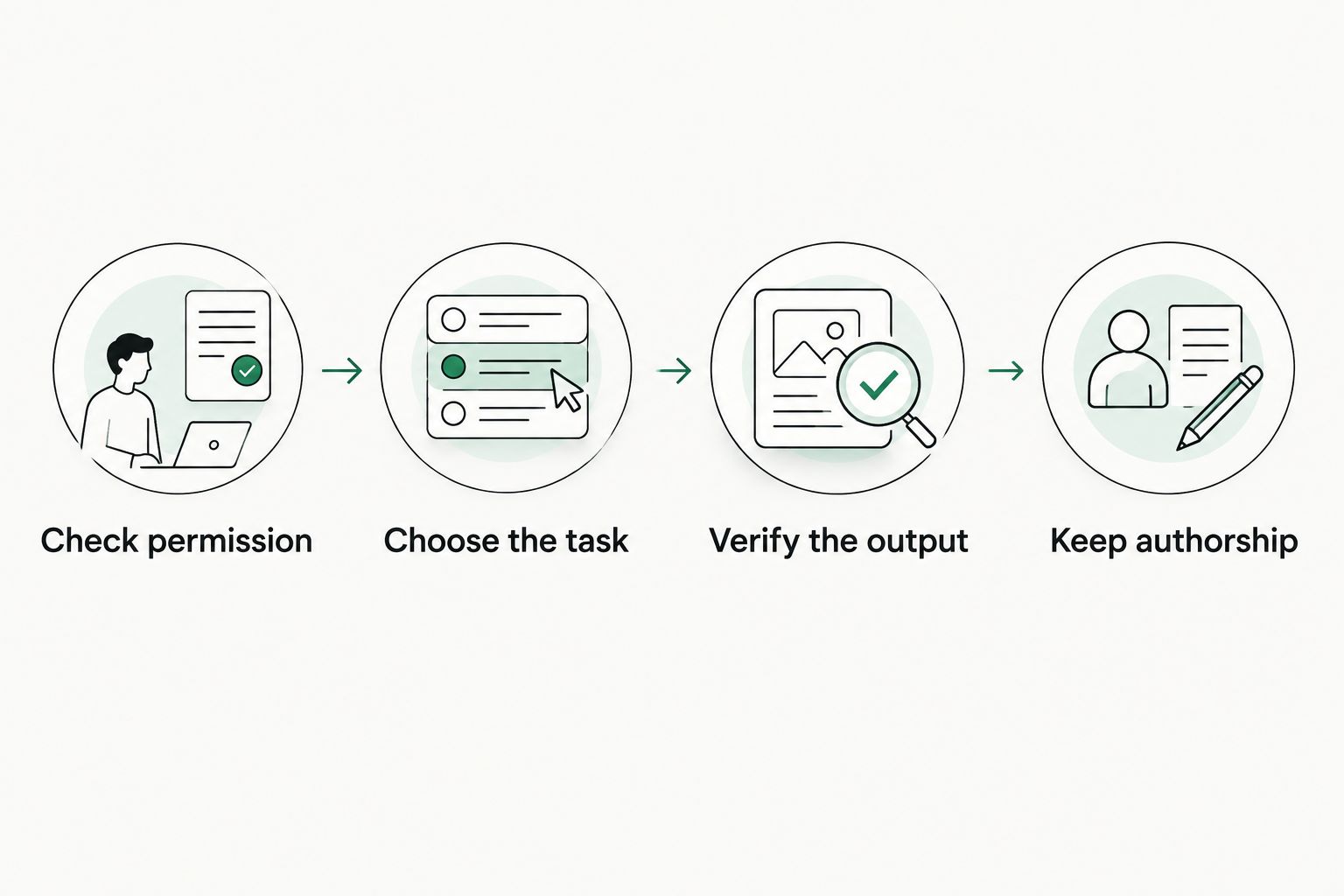
Use this decision sequence before opening an account or uploading work:
- Check permission: Read the assignment's rules and ask about unclear uses.
- Choose the task: Identify one specific learning problem.
- Verify the output: Compare it with the original source or your own worked solution.
- Keep authorship: Write and explain the submitted answer yourself.
Do not upload student identifiers, private messages, classmates' work, or restricted research just to obtain a better response. Remove unnecessary personal information and use only material you are authorized to share. Your school's approved tools and data rules take precedence over this list.
FAQ
What's the best AI tool for students in 2026?
ChatGPT is this guide's default recommendation for general study explanations. NotebookLM, Wolfram Alpha, Claude, and Grammarly are better matches for the narrower tasks identified in the comparison.
Is NotebookLM better than ChatGPT for studying?
NotebookLM is the better match when your task centers on a defined collection of supplied sources. ChatGPT is this guide's choice for open-ended concept explanations and follow-up practice.
Can I use AI tools for homework?
You can use a tool only within the rules that apply to your assignment. Ask your instructor about explanation, proofreading, rewriting, and answer generation separately rather than assuming one permission covers every use.
How much do AI tools for students cost?
The cost depends on the provider, plan, and features you choose. Check current charges, renewal terms, usage limits, and any eligibility requirements before signing up.
Which tool should I use to check math homework?
Wolfram Alpha is this guide's recommendation for checking calculations. Attempt the problem first, confirm the entered expression, and compare the method rather than copying the result.
Can an AI tool verify my essay citations?
A generated citation is not verification. Open the original publication and check the author, title, publication details, and whether it supports your statement.
Should I upload lecture notes to an AI study tool?
Upload lecture notes only when you are authorized to share them with the service. Check course rules and remove personal information or material belonging to other students.
One last thing
The most useful prompt can be a restriction: ask for a hint, not the answer. Before adding another study tool in 2026, try requiring the one you already use to wait for your attempt. If you cannot explain the final answer without the tool open, return to the source material.